Additional taxes (ISC)
Besides ITBIS, the plugin handles the DGII additional taxes in Accounting → Dominican Republic → Taxes.
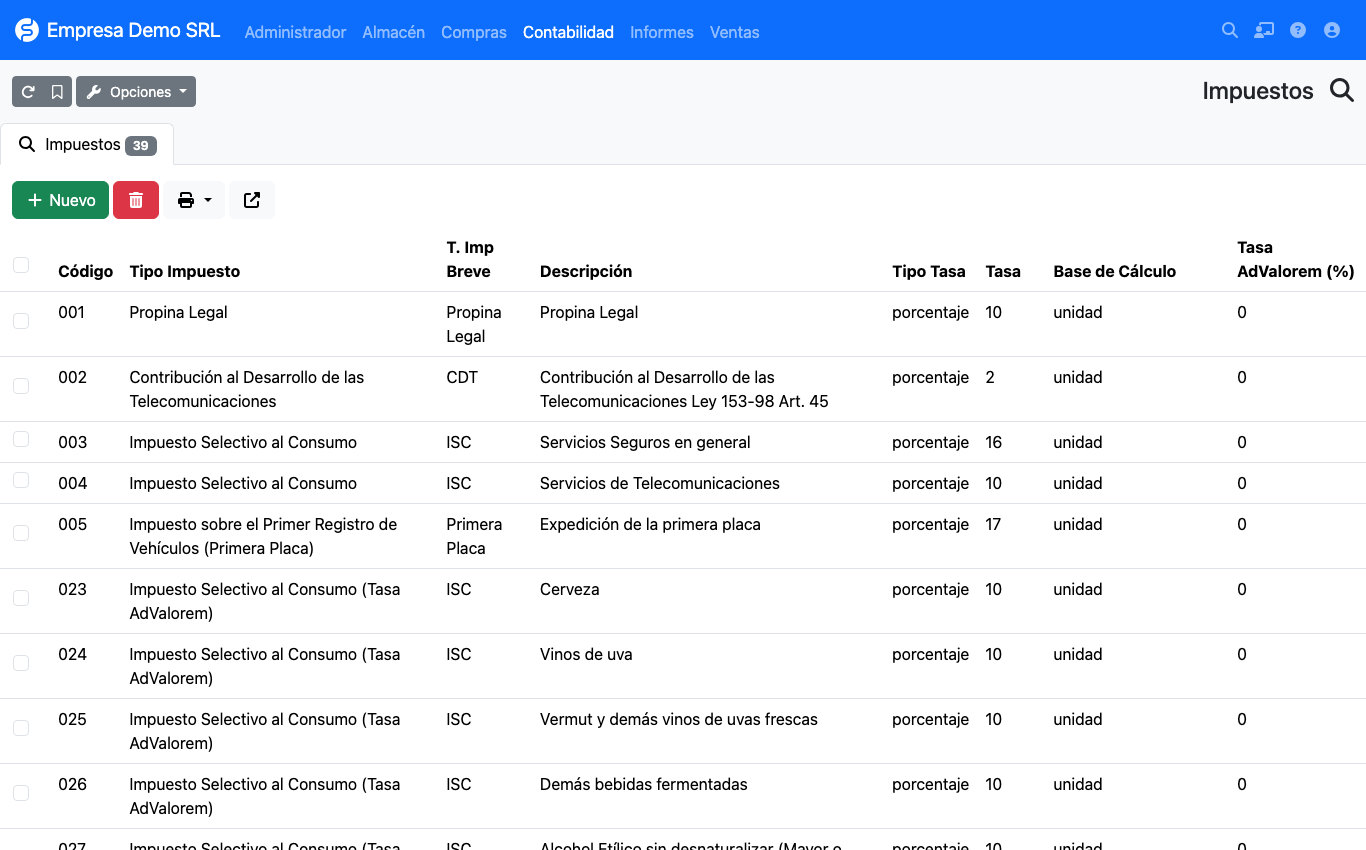
Included catalog
| Codes | Tax | Calculation |
|---|---|---|
| 001 | Legal tip | Percentage (10 %) |
| 002 | CDT, Telecommunications Development Contribution | Percentage (2 %) |
| 003, 004 | ISC on insurance and telecommunications | Percentage |
| 005 | First vehicle license plate | Percentage (17 %) |
| 006 – 022 | Specific plus ad valorem ISC on alcohol and cigarettes | Fixed amount per unit or per liter of absolute alcohol, plus a percentage |
| 023 – 039 | Ad valorem-only ISC on alcohol and cigarettes | Percentage |
For alcohol and cigarettes use codes 006 – 022: they apply the specific amount and the ad valorem percentage in a single tax. Codes 023 – 039 apply the percentage only.
How it is calculated
Each tax defines its rate type:
amount = price before discount × rate / 100
specific     = factor × rate
ad valorem   = base × ad valorem rate / 100
The factor depends on the tax's calculation base:
| Calculation base | Factor |
|---|---|
unidad (unit) |
Line quantity |
litros_alcohol_absoluto |
Quantity × content in liters × alcohol degrees / 100 |
The ad valorem base is the price before discount, plus the specific amount when the tax has ad valorem on specific enabled.
Formulas pending validation
The code flags the specific ISC formulas as pending validation against Law 253-12 and the DGII e-CF technical description. Confirm them with your accountant before using them in production. It is also still open whether the ITBIS base should include ISC (today it is computed on the price before discount only).
Applying it to a line
On the invoice line open the ··· (more options) button. The modal adds the ISC, CDT, Legal tip and 1st plate selectors.
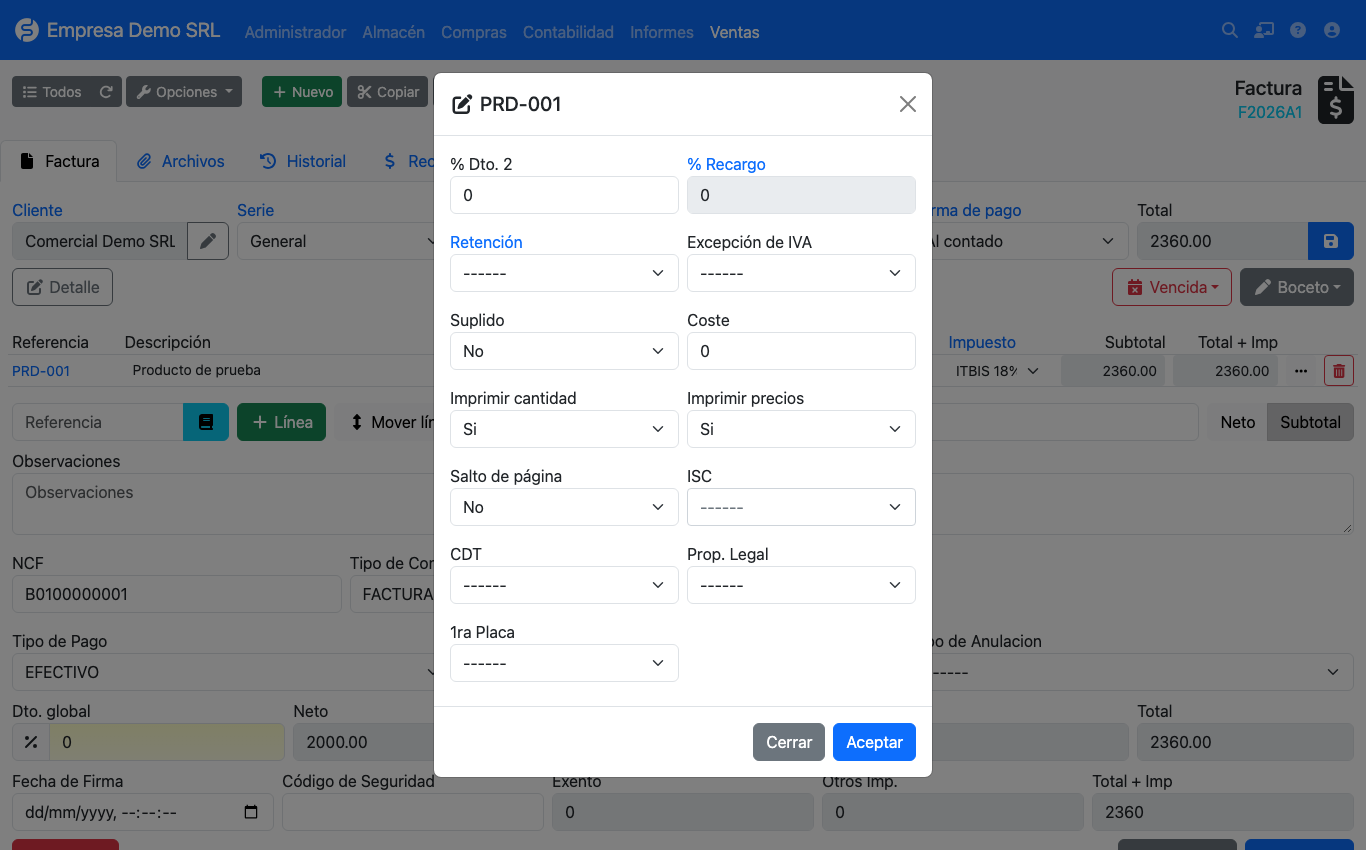
- The ISC selector is searchable and shows [Amount] or [Percentage] in brackets.
- The calculated amount is stored on the line and later appears in the 606 and 607 reports.
- On purchases you can also type the ISC amount manually when the supplier invoice differs from the calculated one.
- The additional tax total is shown on the invoice as Other taxes and Total + tax.
Alcohol and cigarettes: examples
Alcoholic beverages (liters of absolute alcohol)
First fill in the product's Alcohol degrees (%) and Content per unit (liters) (see Products). Example with 014 – Rum and other cane spirits (specific rate 632.58 per liter of absolute alcohol and 10 % ad valorem), 12 bottles of 0.7 L at 40 % alcohol, priced 500.00 each:
liters of absolute alcohol = 12 × 0.7 × 40 / 100        =     3.36
specific ISC               = 3.36 × 632.58              = 2,125.47
ad valorem ISC             = (12 × 500.00) × 10 / 100   =   600.00
line ISC                   = 2,125.47 + 600.00          = 2,725.47
Cigarettes (per unit)
With 019 – Cigarettes containing tobacco, pack of 20 (53.51 per pack and 20 % ad valorem), 10 packs at 200.00 each:
specific ISC     = 10 × 53.51             =   535.10
ad valorem ISC   = (10 × 200.00) × 20/100 =   400.00
line ISC         = 535.10 + 400.00        =   935.10
Other taxes (percentage only)
| Tax | Example | Calculation |
|---|---|---|
| 002 – CDT (2 %) | Service of 10,000.00 | 10,000.00 × 2 / 100 = 200.00 |
| 001 – Legal tip (10 %) | Consumption of 5,000.00 | 5,000.00 × 10 / 100 = 500.00 |
Updating the rates every year
Specific ISC amounts are adjusted for inflation every year. To change them open Accounting → Dominican Republic → Taxes, edit the tax and change its rate. Lines already saved keep the amount they have stored.
The included rates are a reference
The rates for 006 – 022 are the ones in force when this version was published. Compare them with the DGII table for the current year before invoicing.
When you update the plugin
Updating the plugin from an earlier version automatically loads any missing 006 – 022 codes and the tax's new columns (calculation base and ad valorem rate). The update:
- does not modify taxes that already exist, so a rate you edited is kept;
- calculates the amount of old lines that only had the percentage stored;
- can run more than once without duplicating anything.